Automatically recognizes smashes, clears, drops, lifts and drives — and tells forehand from backhand, overhead from underhand. Every shot, sorted.
🏸 AI Badminton & Tennis Coach
Your watch is now
Your watch is now
your AI coach
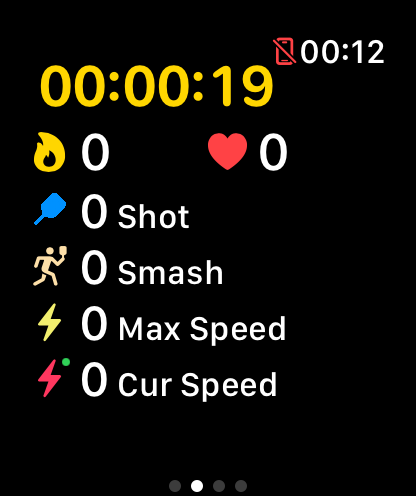
GoodShot lives on your racket arm. Its AI reads every smash, clear and drop, then turns swing speed, heart rate and progress into numbers you can actually use.
Free download · iPhone + Apple Watch
Download on the
App Store
5+
Shot types recognized by AI
4
Watch platform ecosystems
2
Racket sports: badminton & tennis
4
Trend views: day, week, month, year
Core Features
Every swing, seen
No manual logging, no replaying videos. The AI on your wrist has the data ready before you leave the court.
Records the speed of every swing and charts your speed distribution, so you know exactly how fast your smash really is.
Live heart-rate zones and precise calorie tracking show whether your intensity is where it should be.
Daily, weekly, monthly and yearly views turn your training into clear charts that track every bit of progress.
Unlock badminton badges and climb the smash leaderboard — see who hits hardest among your friends.
Badminton watch faces, badge widgets and quick launch — plus a matching feature to find players near you and set up a game.
Watch Platforms
Tracking starts on your wrist
The full experience ships on Apple Watch today, with professional swing analysis reaching more watch ecosystems over time.
Complete swing tracking and sports analytics, with automatic sync to Apple Health.
Bringing professional swing analysis to Huawei's fitness ecosystem.
A smoother training-logging experience for HarmonyOS devices.
Covering Wear OS / Android watch users who track from the wrist.
Getting Started
Five steps to your first tracked session
1
Install on iPhone
Download GoodShot free from the App Store.
2
Add the watch app
Install the GoodShot app on your Apple Watch.
3
Wear it on your racket arm
Put the watch on the hand that holds the racket.
4
Start from your wrist
Open the watch app and play — recording begins.
5
Review on iPhone
After the game, dive into full analytics on your phone.
Feature Checklist
One app for your entire training log
- AI shot recognition: smashes, clears, drops, lifts, drives and more, sorted automatically
- Forehand/backhand analysis: auto-detects forehand vs backhand, overhead vs underhand
- Swing speed: per-swing speed recording and distribution analysis
- Heart-rate zones: real-time intensity monitoring
- Calorie tracking: precise burn for every session
- Apple Health sync: workout data written automatically
- Widgets: badminton watch faces, badge display, quick launch
- Player matching: find nearby players and set up games
- Badges: unlock achievements and milestones
- Smash leaderboard: compete on smash stats with friends
Supported Sports
More than badminton
🏸
Badminton
Smashes, clears, drops, lifts, drives — the flagship sport with the most complete shot recognition.
🎾
Tennis
Full swing tracking and analysis for tennis too. One setup, two sports.
FAQ
Questions, answered
How do I use GoodShot?
Install GoodShot on your iPhone and the watch app on your Apple Watch, wear the watch on your racket arm, and start recording from your wrist. Full analytics are waiting on your iPhone after the session.
Which sports are supported?
Badminton and tennis. The AI recognizes a wide range of racket shots including smashes, clears, drops, lifts and drives.
Does it work with Huawei, HarmonyOS or Android watches?
GoodShot delivers its full experience on Apple Watch, and is extending swing tracking and analysis to the Huawei, HarmonyOS and Android watch ecosystems so players on more devices can join in.
Does my data sync to Apple Health?
Yes. GoodShot writes your workout data to Apple Health automatically, keeping it alongside the rest of your fitness data.
What does PRO membership include?
GoodShot PRO unlocks all premium features, including advanced analytics, historical trends and complete reports.
Bring data to your next game
Download GoodShot free, strap on your watch and play. Every smash, recorded.
Download on the
App Store